Plug in. Power up.
We provide a preconfigured HDMI device for your venue. Connect it to an available HDMI port on your TV and plug in the power. The game setup is already handled.
 My account
GOOD COMPANY. A LITTLE COMPETITION.
Turn an ordinary visit into “let’s play one more round.” NextPlayer brings automated trivia to your venue’s TV—and puts the answer pad right in your guests’ hands.
Everyday trivia. Same-venue team tournaments. No player app to download.
Meet tournament mode →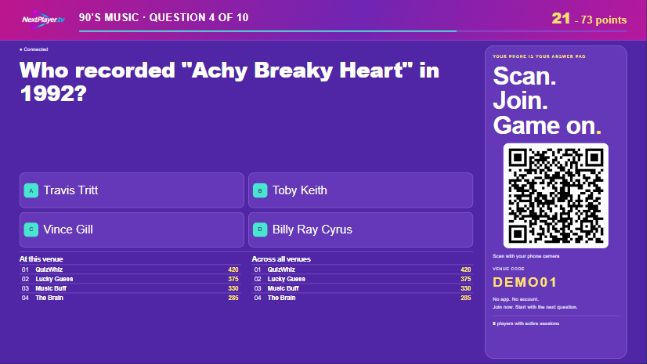
SMALL SETUP. BIG GAME ENERGY.
A TV, an internet connection, and guests with phones. That’s the starting lineup.
We provide a preconfigured HDMI device for your venue. Connect it to an available HDMI port on your TV and plug in the power. The game setup is already handled.
Connect the device to your venue’s internet and select its HDMI input on the TV. Your display is already configured for your venue—no pairing or app installation to work through.
The game handles the questions, countdowns, scoring, and category changes. Your staff can focus on hospitality while the trivia keeps moving.
No smart TV? No problem. Our preconfigured HDMI device turns your existing TV into a trivia screen. You supply the screen and internet; we take care of the game configuration.
FROM “WHAT’S THIS?” TO “I KNOW THIS!”
Music, movies, nostalgia, sports, and more. Regular trivia connects individual players through local and cross-venue leaderboards. Want to bring the rivalry closer to home? Switch to tournament mode so friends can team up against other teams at your venue.
SAME TABLE. SAME TEAM. GAME ON.
Turn your venue into the home of a friendly rivalry. Tournament mode lets friends join the same team and compete against other teams right there in your venue.

A team leader creates a name and shares a team code or QR code. Friends join on their own phones, and every member answers to contribute to the team score. The leaderboard puts team names in the spotlight.
Venue staff choose the categories and round lineup in their account. Open registration, let teams assemble, then start the tournament when the room is ready.
Run from round to round automatically, or have staff decide when each next round begins. Questions, answer reveals and scoring stay automated either way.
A different way to play on the same venue TV. Guests use their phone browsers, with no app download. Tournament competition stays within your venue; regular trivia connects players across participating venues.
YOUR TV. THEIR PHONES. THE REAL GAMEPLAY.
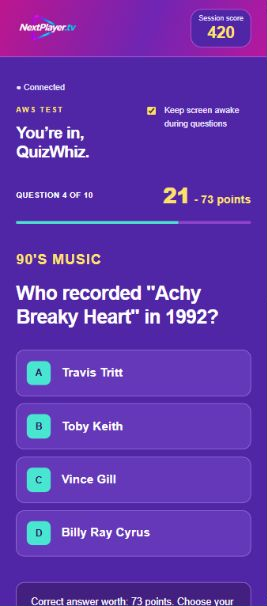
Open the live demo to see the TV display just as it would look on your venue’s screen, with the same questions, countdowns, answer reveals, and leaderboards.
Try the live demoOpens in a new tab. No subscription or payment required. The demo is separate from participating venues and refreshes periodically.
MAKE THE VISIT MORE MEMORABLE
Trivia gives guests something to do together—and gives your venue another opportunity to earn their next visit.
A new category and a close leaderboard can give guests a reason to linger. More time together can create more opportunities for another order.
Use category breaks to show your menu specials, upcoming events, and venue promotions. Your TV becomes part of your hospitality.
Friendly rivalries and familiar screen names can make trivia part of a guest’s routine. Cross-venue competition keeps the game interesting even with a small local crowd.
FEELS RIGHT AT HOME
Your venue’s logo. Your choice of color theme. Up to five images for specials and events during category breaks.
NextPlayer brings the competition across participating venues, while your guests still feel like they’re playing at their local spot.
A FEW GOOD QUESTIONS
No. Regular trivia runs automatically. In tournament mode, staff set up the rounds and start the game, then choose automatic round progression or start each next round themselves. Questions, answer reveals and scoring remain automated.
Yes. In tournament mode, a team leader creates a team and shares its join code or QR code. Friends join on their own phones and each answer contributes to their team score. Teams compete against other teams at the same venue, with team names and scores on the leaderboard.
Your staff choose when setting up the tournament: rounds can advance automatically after a break, or staff can start each next round from their venue account. The Start next round button appears automatically when the round is ready. Staff start the first round after teams have registered.
A TV with an available HDMI port, power, and reliable internet. We provide a preconfigured HDMI device for your venue, so there is no display pairing or app installation for you to handle. Contact us to discuss service and device options.
No. Guests scan the QR code on your TV, choose a screen name, and answer in their phone’s browser. They join while at a participating venue.
In regular trivia, players see competition from other participating venues on the shared leaderboard, with the same questions and categories at the same time. Tournament mode is a separate, local competition between teams at your venue.
Yes. Each venue can upload up to five images to show during breaks between categories—ideal for specials, upcoming events, and other announcements.
Plans start at $40 monthly for three selected gameplay days per week, or $80 monthly for seven-day access. Seven-day prepaid plans are $432 for 6 months or $768 annually. Monthly plans offer an optional HDMI device with a $30 refundable deposit; you can use a compatible smart TV instead. Prepaid plans include the loan device with no deposit. Compare plans and view subscription details.
YOUR NEXT GREAT NIGHT STARTS HERE
Let’s turn your screen into something people come together for.
Let’s get your venue playing info@nextplayer.tvLET’S TALK TRIVIA
Want to bring NextPlayer to your venue, or need a little help? Send us a message and we’ll be in touch.
Prefer email? support@nextplayer.tv
We’ve received your inquiry and will respond as soon as possible.